One Bug's Trip Through My Agent Pipeline

By Scott Brady
Software engineer in Seattle and DIY builder who makes the CutOnce construction calculator.
- ai
- agents
- claude-code
- cutonce
All work on CutOnce is tracked as GitHub tickets. AI agents take each one from ready to done. I file the tickets, answer questions, approve plans, test on real devices, and publish the releases. In the 30 days from October 21 to November 19, 2026, 479 pull requests were merged this way, and I am the only developer. This post follows one bug through planning, review, code, visual QA, and the demo.
Core tenets
The system is built on four tenets:
- Keep working while I’m spending time with family or sleeping. The manager stops on a ticket only when it needs an answer or an approval from me, and it moves on to the next ticket in the meantime.
- Use the cheapest model that does each job at a high level of quality. Sonnet writes the code and tests. Opus is used for planning, review, and visual QA.
- Build a high-quality product. Every plan and every diff is reviewed by two models, P1 and P2 findings must be fixed, and every changed screen is looked at before the work is called done.
- Always give me visibility into the status of work. The plan, the reviews, and the demo screenshots are all posted to the GitHub ticket, so the ticket shows where the work stands.
Clear goals and a way to check them
Agents work best when they have a clear goal and a way to verify they have reached it. Most of my process exists to supply those two things.
For CutOnce the goal is written as acceptance criteria on the ticket, and the plan turns each criterion into named test cases. The way to check is a set of tools the agents can run themselves: more than 12,000 automated tests, lint, and simulators and emulators they can drive to look at the real app.
Agents don’t get bored. Given a goal they can verify, they will work on it autonomously until it is met, through as many rounds of review and fixes as it takes.
Who does what
| Job | Model |
|---|---|
| Manages tickets and subagents, running in a loop (the manager) | Opus |
| Writes the engineering plan | Opus |
| Reviews the plan | Opus and Astra |
| Writes the code and tests | Sonnet |
| Reviews the code | Opus and Astra |
| Visual QA and the demo | Opus, driving iOS simulators and Android emulators |
| Final real-device testing, cutting and publishing the release | Me |
Astra is OpenAI’s gpt-6.2-astra, run through Codex. The manager is the Opus agent in the first row: it runs in a loop, picks up tickets, and hands each job to a subagent. Every reviewer starts with fresh context: it has not seen the conversation that produced the plan or the code, so it reads the work the way a new reader would.
The milestone is the work queue
I create a GitHub milestone for the next release and put tickets in it. The manager works every ticket in the milestone to completion.
The manager also adds tickets to the milestone. When it finds a bug while working on a ticket, it files the bug as a new ticket in the same milestone. When it splits a ticket that is too large, the follow-up tickets go into the milestone too. Those tickets are worked like any other.
The bug
The bug had two symptoms, both on the iPhone Duo. In the book pose, with the phone half-folded like a book, the gray band behind the calculator display had a stepped right edge: the row holding the value stuck out about 40 pt further toward the fold than the strips above and below it. On the cover display, the same band ran under the clock and status icons to the edge of the screen.
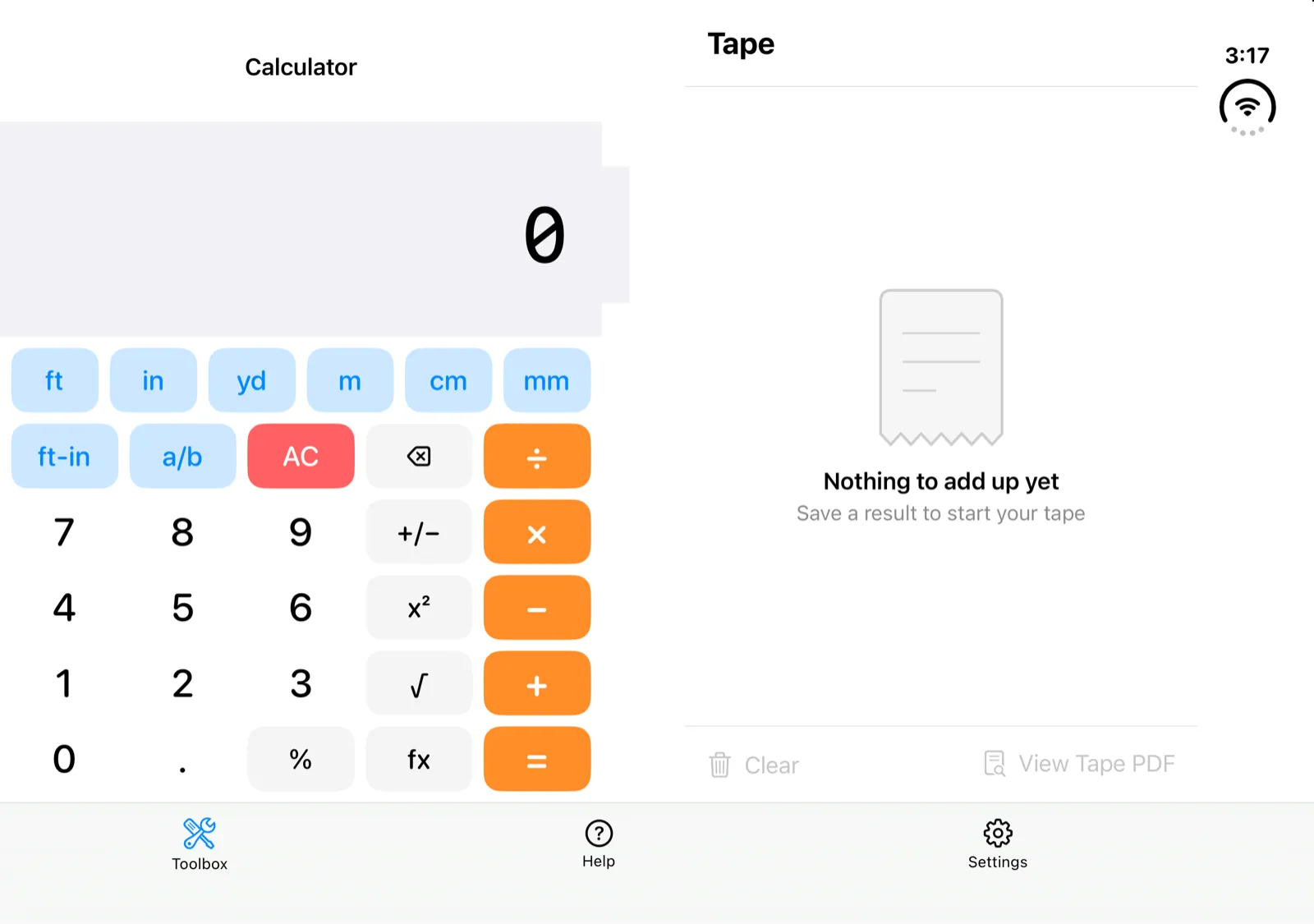
The ticket was in the 1.19.0 milestone with repro steps and four screenshots, and the manager picked it up on its next pass.
The engineering plan
Every ticket goes through engineering planning before any code is written. Opus reads the ticket and the codebase and writes a plan with the same sections every time:
- Summary. One paragraph on what will change and how.
- Open questions. The decisions only I can make, numbered. Often there are none.
- Context. The ticket restated in implementation terms, with the root cause for a bug.
- Acceptance criteria. A numbered list.
- Approach. The design, including whether it covers iOS and Android and both unit systems.
- Files to change.
- Test cases. A numbered list. Each case is tagged with the acceptance criterion it proves, and each one becomes a real test.
- Verification. The commands and manual checks that show the work is done.
The summary and open questions are shown at the top of the plan comment. Everything else is collapsed, so I can read the part that needs me in under a minute and expand the rest when I want it.
For this bug the plan traced both symptoms to one cause: two stacked SwiftUI layers painted the same color and disagreed about safe areas. It listed 14 test cases. It scoped the fix to iOS and said why.
Review until convergence
Opus and Astra then review the plan independently. Opus revises it, and fresh reviewers look again. This repeats until the plan converges, the rounds hit diminishing returns, or there is a question I need to answer.
Every finding is graded P1, P2, or P3. P1 and P2 must be fixed. P3 usually goes on the backlog.
This plan took four rounds:
| Round | P1 | P2 | P3 |
|---|---|---|---|
| 1 | 4 | 2 | 7 |
| 2 | 1 | 3 | 4 |
| 3 | 1 | 0 | 6 |
| 4 | 0 | 0 | 2 |
Round 1 shows why there are two reviewers from two different companies. Opus, reading the plan with fresh context, wrote: “The plan is sound; approve once case 7 is moved onto the pad-stacked path.” Astra read the same plan and found four P1s. One was a flaw in how the planned tests would measure the bug:
Scanning from the leading edge to the first non-band pixel can report the left edge of the displayed
0as the band’s trailing edge.
The tests were meant to find the edge of the gray band, and they could have found the edge of the digit sitting on it instead. A correct fix could have failed its own tests. All four of Astra’s P1s were accepted, and across the four rounds all six P1s came from Astra.
Round 4 had nothing above P3, so the plan had converged. It was posted to the ticket 31 minutes after filing, with all four rounds of reviews attached and no open questions. I approved it a few hours later.
When a ticket is too large
Planning is also where an oversized ticket gets caught. A plan with 20 or more test cases, or 12 or more files to change, is over the limit and gets split. Opus keeps a core in the original ticket and moves whole acceptance criteria, with their test cases, into follow-up tickets written out in full inside the plan. The core has to be able to merge on its own. The reviewers check that nothing was dropped in the split, and the follow-ups are filed into the milestone automatically once the plan is approved.
The display band bug was small and stayed whole. A ticket from the same week did not: adding the 1.19.0 What’s New video on both platforms planned out at 31 files and 45 test cases. It was split into an iOS core and three follow-up tickets, each of which went through the same pipeline separately.
Code and code review
When Sonnet finished writing the fix, its report included this sentence: “no device log was captured”. That meant one test fixture rested on a guess.
Sonnet writes the code and the tests from the approved plan, and its report has to account for every test case in the plan, including the ones it did not finish.
The fix was small. The production change touched two Swift files, and the part you can see is one line:
-        .background(Color(.secondarySystemBackground))
+        .background(Color(.secondarySystemBackground), ignoresSafeAreaEdges: [])
The rest of the Swift was 499 lines in two new test files that render the calculator in each pose and check the band’s edge pixel by pixel.
Opus and Astra then reviewed the diff. They found nothing wrong with the production code. Their P1s and P2s were all in the tests, and the main one was the gap Sonnet had reported: the test fixture used guessed dimensions for the book pose. The fix round measured the real layout on the simulator and corrected the five test cases that used the fixture.
Visual QA and the demo
Passing tests do not prove a screen looks right. Opus does visual QA by driving the iOS simulator and the Android emulator, opening the screens that changed, and inspecting screenshots for anything clipped, misaligned, or overlapping.
Then Opus does a demo run and posts the screenshots to the ticket. That does two jobs. It holds the agent responsible for visual bugs, because its claim that the work is done comes with pictures. And it gives me an easy way to double-check the work without building anything.
The demo for this ticket was posted with 12 screenshots. Ten were the Duo in five poses, each in light and dark: the cover display in portrait and landscape, the book pose, and the open inner display held wide and tall. The other two were an iPhone 18 Pro Max in landscape, light and dark, as a regression check.
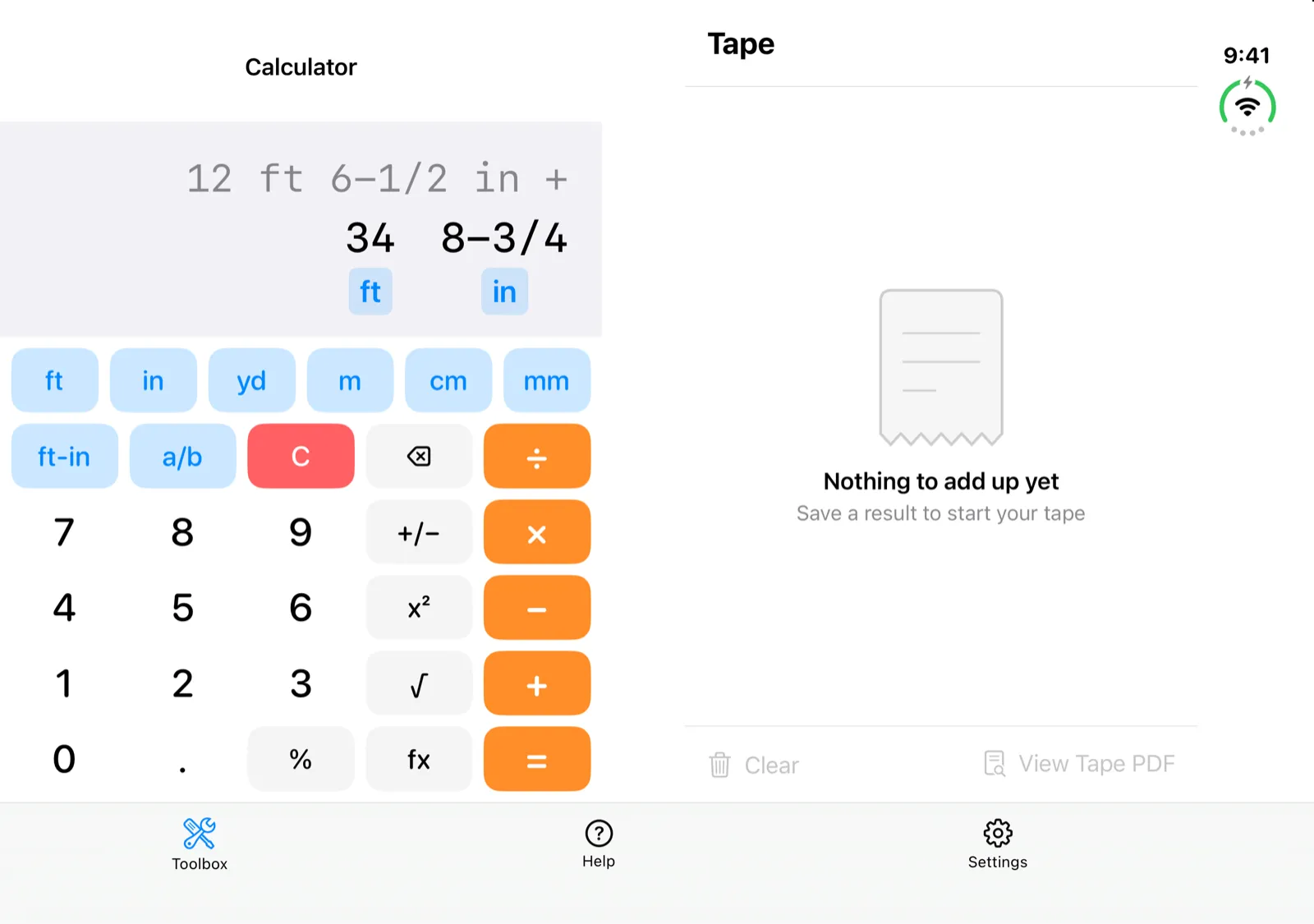
From filing to merge took 15 hours and 23 minutes, and for 5 hours and 7 minutes of that the plan was waiting for me.
What I do myself
Merged code is not yet in anyone’s hands. The agents test on simulators and emulators, and the last check before a release is mine: I do the final testing on real iOS and Android devices. Then I cut the release and publish it to the App Store and the Play Store.
That leaves my list for a release looking like this:
- Create the milestone and put tickets in it.
- Answer the open questions on plans, and approve them.
- Look over the demo screenshots.
- Test the release build on real devices.
- Cut the release and publish it to both stores.
Retrospectives
Every agent runs a retrospective at the end of its turn. All of them answer three questions:
- What went well?
- What didn’t go well?
- What should be done differently next time?
Agents that write code answer four more:
- What would improve what just shipped?
- What is the most likely reason this breaks in three months?
- What assumptions did you make but never state?
- What would reduce development toil?
Feedback about the process goes into an agent retro backlog, which feeds a cycle of continual process improvement. The backlog is groomed for outdated feedback, similar items are deduplicated and counted, and the top-priority items get worked on as tickets.
One item near the top of the backlog was raised by four separate agents: iOS QA has no reliable way to tap through to a screen. That item is still open. Until it is fixed, the agents reach a changed iOS screen with launch arguments that open the app on a given tab or scroll it to a given section. The agents have identified and reduced many points of toil this way. This improvement cycle is what makes the development loop run more reliably over time.
This will look different in a year
New models are released every month, and the best way to work with them keeps changing. Approaches that worked with older models can give worse results with newer ones.
Instructions in AGENTS.md are an example. My older files spelled out procedure step by step, like this:
The expected order of checks for any non-trivial change:
- Lint (
make lintfor iOS,make lint-androidfor Android)- Unit tests (
make test-unit,make test-android-core, etc.)- ViewModel / module tests (
make test-vm,make test-android-app,make test-android-pdf)
Newer models often do better when much of that is deleted. In July 2026 I rewrote the root AGENTS.md and it went from 116 lines to 68. In October a second pass across the AGENTS.md files and the docs they link to removed 3,171 lines and added 2,611, a net of 560 fewer lines.
What I have outlined here works for the models available today. A year from now the models will be different, and so will my instructions to them.
I expect two things to stay the same: a clear goal for every ticket, and a way for the agent to check that it got there.